Addresses can be changed for records where a final licence has not yet been issued.
Use of this feature is restricted to system administrators.
1. Changing address
To change the address retrieve the record requiring an address change.
Go to > Settings > Change property address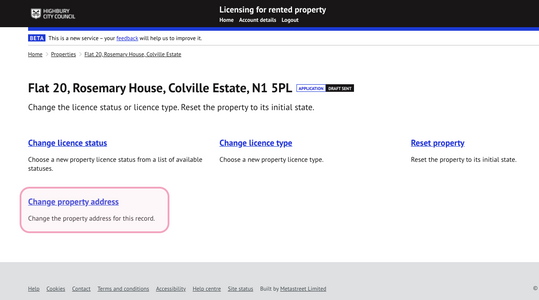
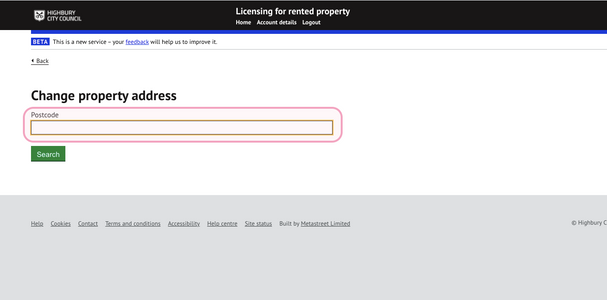
2. Search for new address
Search for the new address by entering the postcode:
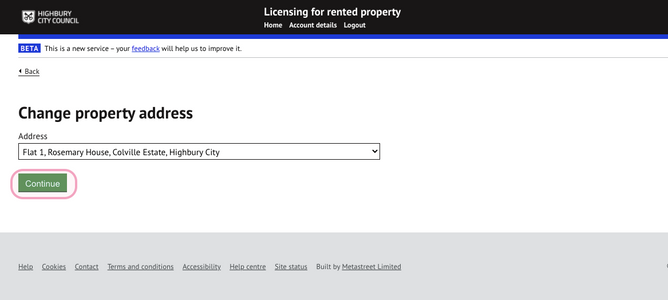
3. Select address
Select the new address from the list and press 'continue':
4. Confirm change
Review and confirm the address change:
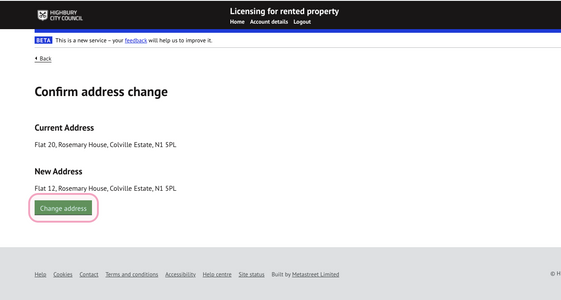
It will not be possible to change the address to one where another active application or licence already exists for that property to prevent duplication.
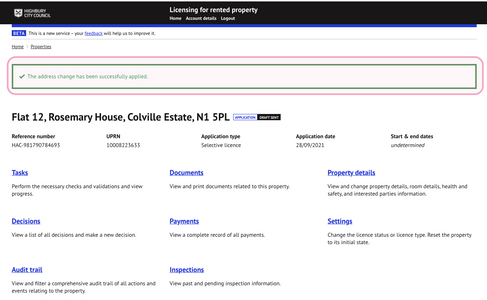
5. Change confirmed
Once the address change has been applied, a message will be shown confirming the address update:
Was this article helpful?
That’s Great!
Thank you for your feedback
Sorry! We couldn't be helpful
Thank you for your feedback
Feedback sent
We appreciate your effort and will try to fix the article