The Address check feature allows council officers to check an address and find out why it is (or is not) appearing in the system.
This helps council officers understand if an address is valid, why it may
not have been imported, or when it was last updated.
Council officers only need to enter the UPRN of the address they want to check.
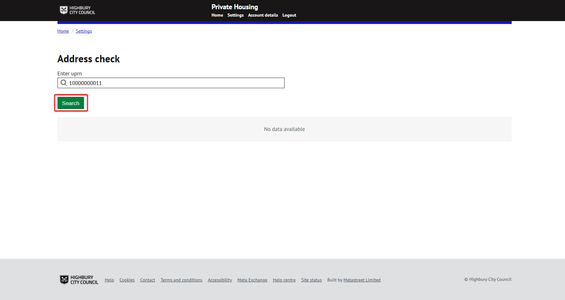
1. Using address check
To use Address check, go to:
Settings > Address check
Enter the UPRN of the address and click the Search button.
2. How address check works
When you search for an address, the Address check feature can return one of three results:
- Valid address
- Invalid address
- Something is not right
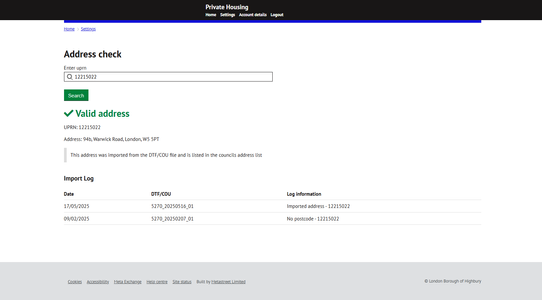
2.1 Valid address
If the result is Valid address, this means the address is in the council’s address list.
Customers can see and use this address.
Council officers can also view logs showing when the address was imported or updated.
2.2 Invalid address
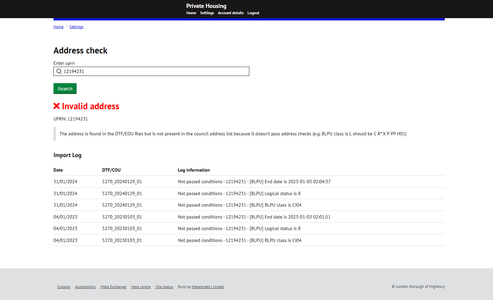
If the result is Invalid address, this means the address is not in the council’s address list.
Customers cannot see or use this address.
Council officers can also view logs explaining why the address was not imported —
for example, if it did not meet the import conditions, even though it was present in the DTF/COU files.
If the address was never included in the DTF/COU files, the log table will be empty.
2.3 Something is not right
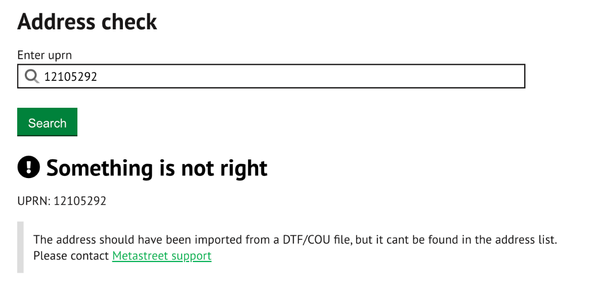
If the result is Something is not right, this means the address is not in the
council’s address list — but according to the Address Check feature, the address should be there.
If you see this result, please contact Metastreet support.
Was this article helpful?
That’s Great!
Thank you for your feedback
Sorry! We couldn't be helpful
Thank you for your feedback
Feedback sent
We appreciate your effort and will try to fix the article