This guide provides instructions on how to configure emailing of licence documentation for printing.
Enabling this feature will display an option to council users to choose whether to send an email to an appointed print service/centre containing all licence documentation for printing when generating the licence letters.
Settings
The settings for this feature can only be accessed by council admin users:
Home > Settings > Correspondence > EmailsScroll to the bottom of the correspondence settings page to the ‘Print service’ section:
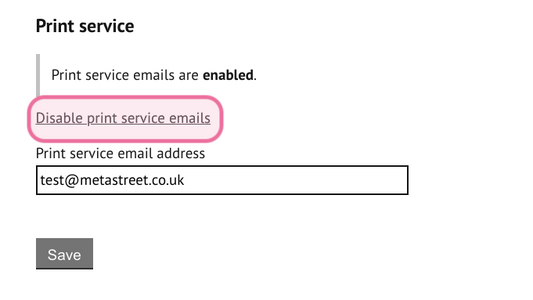 Print service section
Select ‘Enable print service emails’ to activate this feature.
Once activated, the option to deactivate is displayed.
Print service email address
A valid ‘print service email address’ must be entered to specify the email destination. This should be the print service or department that will be managing your printing requests.
Save settings to activate this feature.
Emailing letters
The option to send letters to a print service will be displayed within the task to send draft or final licences. This will appear after the user has specified the date the letters will be sent within the task.
If the user opts to send the print service email, this will be automatically send once the task is updated to ‘letters sent’.
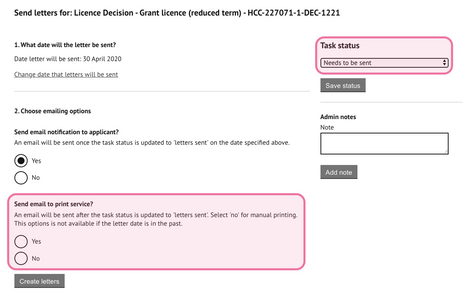
Configuration interface for the Print Service
If the letter date is in the past, the option to send an email to the print service will not be available.
Email
The email sent to the print will contain the generated letters for that licence record for all interested parties.
A copy of this email will be saved to the document store.
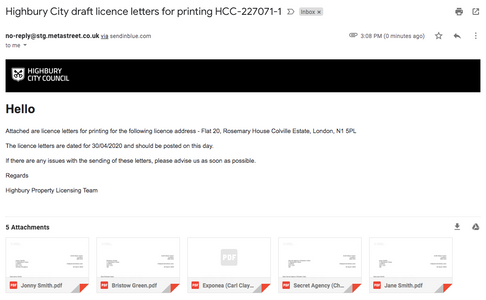
Configuration interface for the Print Service
Was this article helpful?
That’s Great!
Thank you for your feedback
Sorry! We couldn't be helpful
Thank you for your feedback
Feedback sent
We appreciate your effort and will try to fix the article