The public register configuration settings determine which data fields will be visible to public users of the online register of licences.
The public register will only display licences that have been granted and are currently active. Expired or revoked licences are automatically removed from view.
Information displayed
The register is split in two parts:
A) Licence Information
This information relates to all licence types and includes the following:
- Licence type (mandatory)
- Licence reference number (mandatory)
- Year built
- Property description
- Licence holder name
- Licence holder address
- Managing agent name
- Managing agent address
- Licence start date
- Licence end date
B) Additional Information
This information relates to only HMO licence types (i.e. Additional and Mandatory HMO licences) and includes the following:
- No. of storeys
- Sleeping accommodation
- Living accommodation
- No. of self contained flats
- No. of non-self contained flats
- Kitchens
- Bathrooms
- Maximum permitted occupants
- Maximum permitted households
Configure information displayed
Certain fields on the public register can be hidden from view via the control settings accessible by council admin users.
Home > Settings > Configure public register The list of all the available public register information is displayed in the settings:
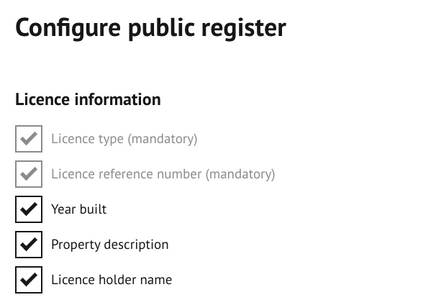
Configuration settings for the Public Register, showing the mandatory and optional data fields available for display.
Uncheck an item to remove this information from the public register. If an item has a tick displayed against it, this will be visible to public users.
Items in grey are mandatory and cannot be removed from view.
Was this article helpful?
That’s Great!
Thank you for your feedback
Sorry! We couldn't be helpful
Thank you for your feedback
Feedback sent
We appreciate your effort and will try to fix the article